
Free Sourcing Tool for Recruiters
Overview
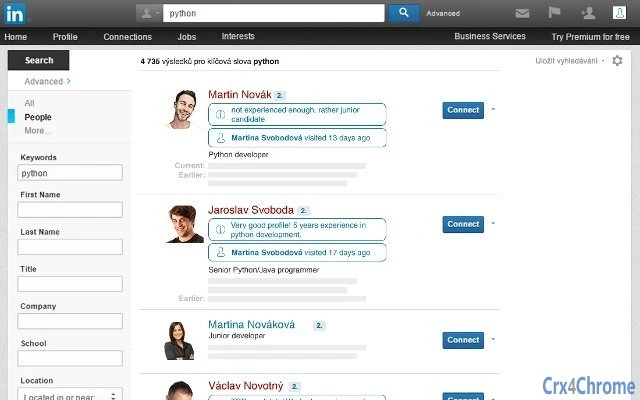
The software is a browser extension designed to enhance recruitment workflows by enabling users to bookmark visited candidate profiles and save notes directly within those profiles. It aims to reduce redundant actions during sourcing by preventing repeated visits to already reviewed profiles. The tool integrates with search results pages, allowing recruiters to view their evaluations instantly, improving efficiency and focus. It is intended for professionals in talent acquisition, HR, and recruitment teams who manage large candidate pipelines.
By centralizing candidate evaluations and visit history, the software supports a more organized and systematic approach to sourcing. Users can quickly identify which candidates have been reviewed, what feedback they’ve provided, and avoid reprocessing the same profiles. This is especially useful in high-volume hiring scenarios where time management and data consistency are critical.
The developer did not provide additional background information. Platform compatibility is confirmed for Windows and Mac. The tool operates as a lightweight extension, with a file size of 2.5 MB, suggesting minimal system impact. No additional system requirements were specified.
Key Features & Capabilities
- Profile Bookmarking – Users can mark candidate profiles they’ve visited, ensuring they are not revisited without intentional action. This helps maintain focus during sourcing cycles.
- Note-Saving Functionality – Recruiters can add and store personal notes directly within a candidate’s profile, enabling consistent evaluation tracking.
- Integration with Search Results – Saved notes and visit status appear directly on the search results page, providing immediate context without switching tabs.
- Time-Saving Automation – Reduces manual effort by eliminating duplicate profile checks and streamlining candidate review workflows.
- Lightweight Design – At 2.5 MB, the software is compact and designed for efficient operation with minimal resource usage.
These features support a more structured sourcing process. For example, a recruiter reviewing 100 profiles in a day can quickly identify which ones have been evaluated and what feedback was recorded. This reduces cognitive load and improves accuracy in candidate selection. The tool is particularly effective in environments where multiple team members collaborate on sourcing, as it maintains a shared reference point.
User Interface, Workflow & Performance
The user interface is designed to integrate seamlessly with existing browser workflows, particularly within recruitment platforms. Navigation remains consistent with standard browser behavior, with minimal disruption to daily tasks. The extension likely appears as a small icon in the browser toolbar, accessible with a single click.
Workflow efficiency is enhanced by the ability to save notes and bookmarks without leaving the current page. The software appears to operate in real time, updating the search results page with visit status and notes as they are added. This supports a continuous, uninterrupted sourcing session.
Performance observations are based on general software behavior patterns. The developer did not specify resource usage details. However, the compact file size of 2.5 MB suggests low CPU and RAM consumption. Stability is expected to be consistent with typical browser extensions, though no formal testing data was provided.
Compatibility & System Requirements
The software is compatible with Windows and Mac operating systems. The version number is 1.0.0, indicating a stable initial release. The installation size is 2.5 MB, which is minimal for a desktop application.
Exact system requirements were not listed. Compatibility information was partially provided. No specific hardware specifications or minimum OS versions were mentioned. The developer did not provide details on supported browsers or versions. Users should verify compatibility with their current setup before installation.
Pros and Cons
Pros
- Free to use with no cost barrier to entry
- Lightweight at only 2.5 MB
- Intuitive integration with recruitment search results
- Efficient time-saving for high-volume sourcing
- Supports collaborative workflows through shared notes
Cons
- Developer background not disclosed
- No information on supported browsers
- Performance data not publicly available
- Limited to bookmarking and note-saving functionality
- Compatibility details for specific OS versions not provided
FAQ Section
Is this software free to download and use?
Yes, the software is available at no cost. It is offered as a free version of a sourcing tool, with no hidden fees or subscription requirements.
Which operating systems does it support?
The software is compatible with Windows and Mac operating systems. Specific versions of these platforms were not listed in the provided information.
Does the tool require an internet connection?
Yes, as a browser extension, it requires an active internet connection to function. Data is stored in the browser environment and synchronized with the recruitment platform being used.
Can I use this tool offline?
Offline functionality is not confirmed. The tool relies on real-time integration with search results pages, which suggests it requires an online connection to operate effectively.
How often is the software updated?
Update frequency was not specified. The current version is 1.0.0, indicating a stable release. Users should check for updates through their browser’s extension manager.
Final Thoughts + CTA
This free sourcing tool offers a focused, efficient solution for recruiters aiming to streamline their candidate evaluation process. By enabling profile bookmarking and in-profile note-saving, it reduces redundancy and improves workflow clarity. Its lightweight design and integration with search results make it a practical addition for professionals managing large volumes of candidate data.
While the developer has not provided detailed technical or background information, the core functionality is well-aligned with real-world recruitment needs. The absence of system requirements or browser details may require users to test compatibility, but the tool’s simplicity suggests broad usability.
For recruiters and talent acquisition specialists seeking to save time and maintain consistent candidate evaluations, this tool delivers clear value. Its free access and minimal footprint make it a low-risk option to test in daily workflows.
Download Free Sourcing Tool for Recruiters now







